Posts

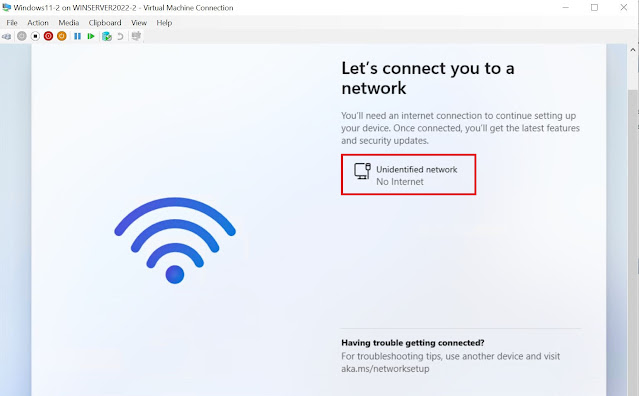
Windows Autopilot - Fixing Windows 11 VM 'No Internet' issue hosted in a Windows Server OS Hyper-V
Image
In my line of work, I have to work with all kind of devices spread across multiple OS platforms. Now when it comes to building and testing a configuration on Windows endpoints, I would normally use a physical device or in absence of it, I will turn to a virtual setup involving a Windows 10\11 VM or most recently a Cloud PC. For sometime now, I have been hosting the Windows 10\11 VM in a Hyper-V installed on a Windows 10 Azure VM enabled & configured for nested virtualization. While this got the job done, it couldn't really match the performance of what Hyper-V running on Windows Server OS could deliver. I recently setup a new test tenant and used it as an opportunity to cleanup and introduce some new configurations. I decided to setup a Windows Server 2022 OS VM and installed Hyper-V on it then created the guest Windows 11 VM inside it. While I followed the usual steps of putting the configuration together like I did before, I did encounter some issues and learnt some new thing...
Why protecting BitLocker Recovery key retrieval is so important..

Image
Majority of organizations will allow end users to retrieve the BitLocker recovery key through self service. While this certainly eases the manageability and cuts down on support calls, the question to ask here is whether it is secure or not. To answer that, let me play out a scenario first. Let's say a bad actor has got access to a company device and is able to initiate a reboot into advance startup. Now a device that is encrypted with BitLocker protection, will be presented with the screen to enter the recovery key. At this stage one can retrieve the recovery key either through self service portal like https://account.microsoft.com/devices/recoverykey or reach out to service desk. Now what if the attacker has been successful in stealing the credentials of the owner of the device? In the absence of necessary security policies in place, the attacker can retrieve the recovery key from https://account.microsoft.com/devices/recoverykey, or even Entra admin portals by themselves if allo...

Protect Microsoft Admin Portals with SIF + (Phishing resistant MFA Or Compliant Device)

Image
Source: Microsoft The memo 22-09  utilizes Microsoft Entra ID as the centralized identity management system when implementing Zero Trust principles and requires employees using enterprise-managed identities to authenticate through multifactor authentication through the means of FIDO2 security keys or Windows Hello for Business to protect against phishing related online attacks. There are multiple options for meeting phishing-resistant multifactor authentication requirements with Microsoft Entra ID. However, the trajectory should be towards implementing modern credentials. Some of the modern approaches are - 1. FIDO2 security keys which according to the Cybersecurity & Infrastructure Security Agency (CISA) is the gold standard of multifactor authentication. 2. Microsoft Entra certificate authentication without dependency on a federated identity provider. 3. Windows Hello for Business as phishing-resistant multifactor authentication Access to Microsoft admin portals like Microsof...

Working with Microsoft Entra Smart Lockout protection

Image
If you follow @merill from Microsoft on X, then he recently shared a one pager on Microsoft Entra security capabilities . It caught my attention and I wanted to verify which all security features I had already implemented so far. While going through the list, I realized that I had actually left out on testing and understanding the end user behavior of one of the security capabilities i.e. Microsoft Entra Smart Lockout , and decided  to give it a go. Let's first see what is this feature all about. What is Smart lockout and how it works? Smart lockout helps in protecting against bad actors that try to guess passwords of end user accounts or use brute-force methods to get in. The feature can recognize sign-ins that come from valid users and treat them differently than ones of attackers and other unknown sources. By default, smart lockout locks an account from sign-in after 10 failed attempts in Azure Public and Microsoft Azure operated by 21Vianet tenants, while 3 failed attempts for...