Posts

Showing posts with the label Known Folder Move

Issue involving OneDrive 2.0 Known folder move and Settings Catalog in Intune

Image
Are you deploying OneDrive configuration including Known folder move using Settings Catalog and wondering why your known folders Documents and Pictures are not synching like Desktop , then you are not alone. Ever since settings catalog was introduced, I have practically moved all my device policies over, where ever possible of course. Naturally, I moved OneDrive settings as well, but soon realized that this may not be such a good idea. At least not until Microsoft addresses the issue. As of writing this blog, it is not possible to configure all known folder move configuration in settings catalog. Currently the following settings are available under Settings Catalog - When you configure these settings and assign them, only the Desktop known folder will get enabled for sync, leaving the other 2 known folders Documents and Pictures un-managed. To fix this natively in Intune, the only option is to use built Administrative template. This is because the built-in administrative templates...
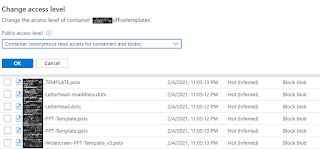
How to configure Custom Office Templates using Intune

Image
Most organizations use custom office templates and traditionally GPO would be used to configure them. However, things are evolving and traditional methods may not get you the desired results anymore. One will need a more robust method which allows you to manage the templates centrally and update the same on end user devices quickly and efficiently. I recently had a similar requirement and decided to blog about the configuration I put in place. Things that you will need – Devices enrolled into Intune. Azure Blob Storage. Onedrive for Business installed and configured for Known folder Move (KFM) Step 1 – Upload the templates in the Blob storage and set the relevant permissions. You can set it to Private to make it restrictive, but I am choosing to make it Anonymous for the Container at a granular level.   Step 2 – Create the Admin template policy to configure the custom templates location as shown below – Sign-in to the  https://endpoint.microsoft.com Browse to...