Posts

Showing posts with the label GPO

The curious case of Defender ASR rules not enforcing from Intune

Image
  It was a cold gloomy day when I set out on a mission to fix an issue involving ASR rules. Something which I may have done a dozen of times so I said to myself, why it should be any different this time. But if history has taught me anything, it is that no two issues are the same, despite how much they resemble and that for every issue there is a possible solution. You just have to stay relentless and you will eventually make it to the other side. The issue.. It all began with the ASR rules in 'block mode' starting to block macros on a set of devices. Pretty routine at this stage as the logical thing to do is either to configure necessary exclusions or put the relevant ASR rule in a non restrictive state like 'Audit' mode. The problem is that no matter what changes I made to the ASR rules, they simply didn't make any difference. Macros continued to be blocked and the events in Advanced hunting would confirm the same. When I checked the registry on the devices in que...
Prevent users from running certain programs or applications on Windows endpoints using Intune

Image
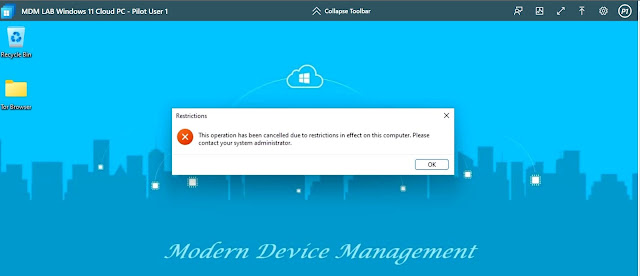
  When it comes to blocking or preventing users from running an application on Windows devices, one normally uses App locker policy, Windows Defender Application Control and not so new but pretty useful method called Defender Vulnerability management within Microsoft 365 Defender Portal. A recent question on the Tech Community Microsoft forum prompted me to look for all possible alternatives. I started reminiscing over the legacy GPO policies and that is when I stumbled upon the policy  Don’t run specified Windows applications  located under User Administrative Templates - The policy setting does come with its own caveat - " This policy setting only prevents users from running programs that are started by the File Explorer process. It does not prevent users from running programs, such as Task Manager, which are started by the system process or by other processes. Also, if users have access to the command prompt (Cmd.exe), this policy setting does not prevent them from st...

Deploying latest Microsoft Edge Security baseline using Intune

Image
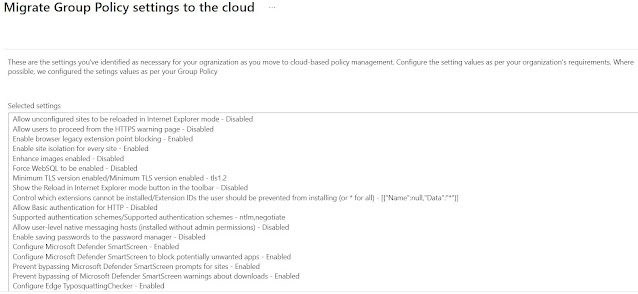
Microsoft keeps the security baselines up to date in general with each new versions coming out. Be it Windows OS 10\11, Windows Server OS 2022, Microsoft 365 Apps or Edge. Edge security baseline for v112 was recently released and I wanted to roll this out in my tenant using Intune. This blog covers the details on the setup. If you are using still using GPOs, then you can easily import the security baseline templates and assign them. In Intune, Microsoft had introduced Security baseline profiles to allow rolling out the security baselines out of the box. However, despite being a cloud managed feature, the baselines have not been updated in a long time. However, as of 31st March 2023, in a blog post comment, Microsoft have indicated that the security baselines may now finally be getting updated in Intune. More details can be found in this  link . This is fantastic news and long awaited in my opinion. However, if you don't want to wait until the security baselines are updated in Intu...

How to deploy Microsoft 365 Apps security baseline using Intune

Image
  Microsoft releases security baseline for Microsoft 365 apps every 6 months keeping in with the release cadence of Microsoft 365 apps semi-annual channel which normally happens in June and December. At the time of writing this blog, following are the available deployment methods: Cloud policies - Can be deployed with the Office cloud policy service for policies in HKCU.  Cloud policies apply to a user on any device accessing files in Office apps with their AAD account. ADMX policies - Can be deployed with Microsoft Endpoint Manager (MEM) for both HKCU and HKLM policies. These settings are written to the same place as Group Policy, but managed from the cloud in MEM using either Administrative templates or the settings catalog. Group Policy - Can be deployed with on premise AD DS to deploy Group Policy Objects (GPO) to users and computers. Note: Depending on the deployment method, registry keys will be written accordingly and they will be observed in order of precedence:...

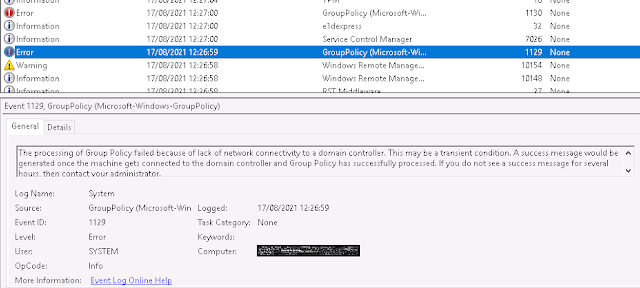
The curious case of Group Policy Event ID 1129

Image
I recently worked on setting up a startup script GPO policy for installing ConfigMgr agent and almost immediately I started noticing issues with it. This seemed a bit odd as I had used the same script and the setup in another environment and there were no issues. It was time to do a deep dive and after checking for the relevant permissions for the script and the network share, I moved my focus to the event logs. I noticed event ids 1129 followed by 1130. Event id 1129  translates to -  The processing of Group Policy failed because of lack of network connectivity to a domain controller. This may be a transient condition. A success message would be generated once the machine gets connected to the domain controller and Group Policy has successfully processed. If you do not see a success message for several hours, then contact your administrator. What can cause this error? According to Microsoft , the error can be caused due to the following reasons -  1. The Netlogon service...

Fixing 'SMB Signing Disabled or SMB Signing Not Required' vulnerability.

Image
If your organization is using a vulnerability scanning tool then more often than not, vulnerability like  SMB Signing Disabled or SMB Signing Not Required will flag up and probably make it to the top of the list. This is because most organizations may not have SMB signing enabled by default for all their client and server communications. What is SMB signing? SMB signing is a security mechanism in the SMB protocol which is  designed to help improve the  security of the SMB protocol.  SMB signing adds security to a network using NetBIOS, avoiding  man-in-the-middle attacks and w hen enabled on both the client and server, SMB sessions are  authenticated between the machines on the packet level. According to Microsoft , following SMB configuration scenarios can play out - If SMB Signing is enabled and required at both the client and the server, or if SMB signing is disabled at both the client and the server, the connection is successful. If SMB signing is enabl...