Posts

Showing posts with the label Account Protection

Windows LAPS with Microsoft Entra (Azure AD) and Microsoft Intune

Image
  As of writing this blog, Microsoft have released Windows LAPS for both Azure AD joined and hybrid Azure AD joined devices. An official Cloud LAPS solution has been long awaited and it is finally here. While still in Public preview, it is a good time to test the feature. I tested the solution in my tenant and captured the relevant bits. Check it out. First of all, lets see what the current requirements are - Supported Azure Regions - -Azure Global -Azure Government -Azure China 21Vianet Operating system updates that are currently needed - This feature is now available on the following Windows OS platforms with the specified update or later installed: -Windows 11 22H2 - April 11 2023 Update -Windows 11 21H2 - April 11 2023 Update -Windows 10 20H2, 21H2 and 22H2 - April 11 2023 Update -Windows Server 2022 - April 11 2023 Update -Windows Server 2019 - April 11 2023 Update Device identities that are supported - - Azure AD joined - hybrid Azure AD joined devices only. Note: Azure AD re...

PIN recovery, Temporary Access Pass, what can go wrong?

Image
  It's pretty normal for enterprise users contacting support team for password resets\recovery or perhaps doing it themselves using Self service password reset. However, in a passwordless environment, this can become a bit of a challenge because password will not normally be shared with the end users. If the organization is using Temporary access pass then it can be used for account recovery in general. I wrote a blog about this which you can refer to over here . This in turn should allow the end users to reset the PIN as well. It can be done right from the lockscreen, but the feature needs to be enabled first. If your devices are enrolled in Intune, then you can enable the feature using either the Identity Protection template or Account Protection Endpoint security policy. I am using Identity Protection policy to enable the feature as part of my overall Windows Hello for business configuration. Here is how you can do it. 1. Head over to Microsoft Endpoint Manager admin center . 2....

Fixing the issue of remote sign-in though Remote Desktop Services using Local group membership setting in Intune

Image
If you have a need for non-admin users to remote into Windows devices (Physical or VM), then in order to do so, they need to be a member of the Remote Desktop Users group. Now for Domain joined devices, this can be easily achieved by pushing down a policy using GPO. But how do you address this on devices joined to AAD? Read on to find out.. Back in March 2021, I had blogged on configuring local admins using LocalUsersandGroups CSP . Since then, Microsoft have recognized the need for managing the memebership of the built-in admin groups and introduced a new profile under Endpoint Security known as Local user group membership (At the time of writing this blog, the feature is still in preview). This template profile will allow IT admins to add, remove, or replace users and user groups to the built-in local groups on Windows devices. We are going to use this new template profile to configure the membership for the built-in Remote Desktop Users g roup. Cuurently, the template setting al...

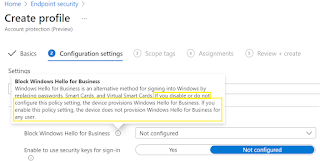
How to Block Windows Hello for Business using Account Protection policy in Intune

Image
In one of my earlier blogs , I had covered how to setup Windows Hello for Business (WHfB). In this blog I want to cover how you can block it completely using Intune. Recently, I had a requirement where the customer wasn’t ready to enable WHfB in their organization. While the feature can be disabled tenant wide, it only applies during the Out of Box Experience or OOBE at the time of device enrollment. Also, the tenant wide setting will not apply if a device is already enrolled. One obviously needs to meet the pre-requisites to be able to use the feature and you can refer to the Microsoft's official link . Now if you want to perform an Autopilot reset to re-provision a device, then WHfB will get enabled by default.  This is because according to Microsoft , “When Windows 10 was released to general availability, Microsoft changed the behavior of the Office 365 Azure AD stack. When a user selects the option to join a work or school network, the device is automatically joined to the Of...