Posts

Showing posts with the label Microsoft GraphAPI

Microsoft Intune Connector health monitoring using Power Automate - The ins and outs.

Image
  If you work with Microsoft Intune to manage devices, be it corporate or personal, then most likely you would have dealt with monitoring the health of different Intune connectors. Admins can check their Intune tenant’s connector health using the Tenant Status page in the Microsoft Intune admin center. However, as of writing this article, there is no option available natively within Intune to proactively notify administrators on the health of the Intune connectors like Apple's Push Notification service (aka APNs). APN is a critical service which uses an Apple MDM Push certificate to manage iOS/iPadOS and macOS devices in Microsoft Intune. This certificate is required to be renewed annually and in failing to do so, you can end up re-enrolling all your Apple devices. In fact, Apple sends an automated email to the registered Apple ID configured for MDM Push Certificate, advising to renew the certificate before it expires. It looks something like this - The reminder frequency is 30, 1...

Corporate identifiers and Android BYO with work profile - GraphAPI to the rescue!

Image
When a device is enrolled in Intune as a corporate device then Intune can collect full phone hardware and app inventory, but only partially for devices enrolled as personal. The benefit of managing devices  as corporate is the unlocking of additional device management capabilities as compared to personal devices. At the time of writing this blog, Intune automatically assigns corporate-owned status to devices that join to Microsoft Entra via: - Device enrollment manager account (all platforms) - An Apple device enrollment program such as Apple School Manager, Apple Business Manager, or Apple Configurator (iOS/iPadOS only) - Windows Autopilot - Co-management with Microsoft Intune and group policy (GPO) - Azure Virtual Desktop - Automatic mobile device management (MDM) enrollment via provisioning package - Knox Mobile Enrollment - Android Corporate-owned devices with work profile - Android Fully managed devices - Android Dedicated devices. - Android Open Source Project (AOSP) Corporat...

How to force escrowing of BitLocker recovery keys using Intune

Image
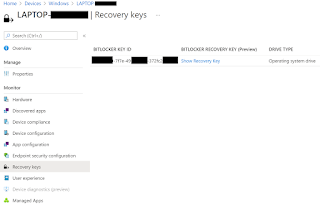
Every now and then it so happens that BitLocker recovery keys do not escrow in AAD. The usual culprits are incorrect BitLocker policies and\or the device hardware configuration failing to meet the minimum requirements. The other scenario and something I recently experienced is when everything is setup right and still the recovery key doesn’t escrow in AAD. As I understand, this can happen if the escrow process got interrupted the first time due to network or local devices related issues and the process could not resume. To circumvent this issue, one can simply push a PowerShell script to the devices to force the escrow of the recovery keys to AAD. Here is a script to do so. try{ $BitlockerVol = Get-BitLockerVolume -MountPoint $env:SystemDrive         $KPID=""         foreach($KP in $BitlockerVol.KeyProtector){             if($KP.KeyProtectorType -eq "RecoveryPassword"){              ...