Posts

Showing posts with the label CSP

Deny all access to Removable Storage using Intune

Image
  The Removable Storage Access Control feature enables you to apply policy by using OMA-URI or by using Intune user interface to either user or device, or both. Until now, I have been using Endpoint security profiles to implement device control settings to manage write access to removable drives like USB. However, recently I needed to block access to removable storage altogether and I couldn't make it work using Endpoint security ASR Device control profile. As of writing this blog, these are relevant settings that are available in the Device control profile. I expected Block Removable storage to work, but it didn't. I couldn't find any obvious errors so decided to do some research. One way is to use OMA-URI CSPs which are broadly broken down into following categories - Using Default Enforcement, you can set the default access (Deny or Allow) for all Device Control features ( RemovableMediaDevices, CdRomDevices, WpdDevices, PrinterDevices ).  Another way is to use device sto...
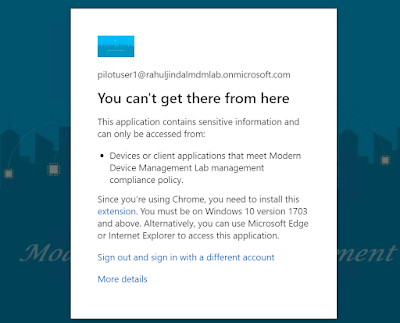
Enable Google Chrome browser extensions using Settings Catalog in Intune to support Conditional Access Policies

Image
When I blogged about using settings catalog for Google Chrome browser settings  back in March 2022, I knew this is only a start as Google Chrome's admx was now built into Intune. After only a couple of weeks, I now find myself using settings catalog again to configure yet another Google Chrome browser setting which I had been configuring using CSP all this while. The configuration in question is for enabling specific Google Chrome browser extensions in order to support device state based Conditional Access policies. Enabling Google Chrome Windows Accounts or Office Online extensions Windows Accounts  or Office Online  extensions are required if you want Google Chrome browser to support Conditional Access policies where device state is being used as a condition. Note: These extensions may not work with Hybrid Azure AD join scenario and may only work for Azure AD identity. In this blog, I will configure Windows Accounts extension as an example. Follow the steps below ...

Using Google Chrome Built-in ADMX settings in Intune for Windows 10 and later

Image
Back in December 2020, I had blogged about leveraging Google Chrome's CSP settings to configure Google chrome browser configuration on Windows 10 devices. As of March 2022, using this ADMX backed CSP for Google Chrome is no longer required because now Microsoft have added the ADMX as an admin template in the Device Configuration profile in Intune. Strangely, as of writing this blog, the ADMX has not been added in Settings Catalog as yet, but atleast it is good to know that now the Google Chrome settings can be deployed natively using Intune. <Update 26.03.2022 - Google Chrome ADMX settings are now available in Settings Catalog. Keep reading to check the configuration later in the blog.> Administrative Template Settings in Intune 1. Navigate to Microsoft Endpoint Manager admin console. 2. Under Devices -> Windows -> Configuration profiles -> Create profile. 3. Under Platform, select Windows 10 & later . 4. Under Profile types, select Templates -> Administrati...

Fixing the issue of remote sign-in though Remote Desktop Services using Local group membership setting in Intune

Image
If you have a need for non-admin users to remote into Windows devices (Physical or VM), then in order to do so, they need to be a member of the Remote Desktop Users group. Now for Domain joined devices, this can be easily achieved by pushing down a policy using GPO. But how do you address this on devices joined to AAD? Read on to find out.. Back in March 2021, I had blogged on configuring local admins using LocalUsersandGroups CSP . Since then, Microsoft have recognized the need for managing the memebership of the built-in admin groups and introduced a new profile under Endpoint Security known as Local user group membership (At the time of writing this blog, the feature is still in preview). This template profile will allow IT admins to add, remove, or replace users and user groups to the built-in local groups on Windows devices. We are going to use this new template profile to configure the membership for the built-in Remote Desktop Users g roup. Cuurently, the template setting al...

Looking beyond CSP and using Settings Catalog to configure Time zone using Intune

Image
Back in June, 2021, when I first blogged about using Settings Catalog , I knew that the addition of this device configuration profile by Microsoft was a step in the right direction. Fast forward to 2022 and my take on Settings Catalog has only been re-affirmed. Even though the feature is still in preview, it is clearly evident that a lot of development work has gone into it and kudos to Microsoft product group for keeping at it. Even thought some  CSPs  are still missing, majority of them are actually added and supported now. To such an extent that I hardly find myself using CSPs anymore. One such use case is configuring time zone setting, a CSP  that pretty much every organization have on their list of requirements for Windows devices that are being managed by Intune. I recently used the Settings catalog to configure the time zone and if you want to know how to configure this then keep reading. :-) First, get a list of available time zones. This can be done using the Pow...

How to disable IE11 using Intune

Image
If you have been following the messages in the message center in Microsoft 365 Admin portal, then you must have seen the recent message MC316144 for the retirement of IE set for June 15, 2022.  So what does this really mean? If you are still using IE11 in your organization, then all access attempts  made by the end users to the browser will get redirected to Microsoft Edge because IE11 desktop application will no longer be supported. Note: Windows 10 LTSC and Server not affected. As the first step, I will suggest to check the Browser usage report dashboard in Microsoft 365 Admin Portal . This can be accessed by navigating to Reports>Usage. The usage report will give you insight into how many users are still accessing legacy browsers. If you have a requirement for running sites in IE legacy mode and if you haven't already configured E nterprise IE mode , then you can head over to the my previous post  Configure the Enterprise Site List mode the modern way ...