Posts

Showing posts with the label Company Portal

Why is the enrolment through Company Portal unavailable? Don't go down the rabbit hole..

Image
Credits: Adobe Stock While working on a MDM migration project, I came across an interesting issue in Intune that almost had me heading down a rabbit hole. As part of the migration, the existing mobile devices were to be un-enrolled from a non Microsoft MDM solution and then enrolled into Intune using the Company Portal method. Nothing fancy, but when this process didn't work, I obviously got into an investigation mode and started looking at some of the obvious things. The obvious items that I looked at - 1. Network requirements for Intune, Android and Apple services. I must state that in this customer's tenant they had ADFS setup, so that added to the complexity. However, since the enrolment was taking place outside the customer's network, none of the network requirements really played a factor. 2. Intune device platform restrictions. Normally when a device is not allowed to enrol in Intune, more often than not it is due to device platform restriction policies. Especially ...

Intune Web based device enrolment with Just-in-time registration and Defender for Endpoint onboarding for iPadOS - Tips from the field!

Image
I recently worked on a project that required setting up Intune and Defender for Endpoint enrolment policies for iPadOS. While some might say that this is a pretty routine task and in an absolute sense, it may very well be to some extent, I actually went another way. Let me start by mentioning that the iPadOS devices in scope were existing devices and in some come cases BYO so resetting them was not an option. Therefore, a user based enrolment had to be the choice of enrolment. Now back in the days, one would normally enroll the iOS\iPadOS devices using Company Portal and while this is still supported, with the introduction of support of Single Sign On extensions (SSO) of Apple devices, I chose to configure Web based device enrolment together with Just-in-time (JIT) for iPadOS devices. Web-based enrolment utilizes just in time (JIT) registration with the Apple single sign-on (SSO) extension to facilitate Microsoft Entra registration within the work apps thus reducing the number of authe...

Reduce app sign-in prompts with SSO on macOS using settings catalog in Intune

Image
  The Microsoft Enterprise SSO plug-in provides single sign-on (SSO) to apps and websites that use Microsoft Entra ID for authentication, including Microsoft 365. This plug-in uses the Apple single sign-on app extension framework and it reduces the number of authentication prompts users get when using devices managed by Intune. I recently blogged about configuring SSO plug-in for iOS devices and wanted to cover a part of the SSO configuration for reducing Microsoft Entra ID sign-in prompts on a macOS, with a focus on Microsoft 365 apps using Intune. My test device is already enrolled, installed with Company Portal app and I manually changed its ownership to Corporate. What are the pre-requisites? - The device is managed by Intune. - macOS 10.15 and newer - The Microsoft Company Portal app must be installed and configured on the device. Intune Configuration There are multiple configurations needed for this to work - a. Extensible Single Sign-on (SSO) settings catalog 1. Sign-in to...

Managing & securing web access by using Edge for mobile devices

Image
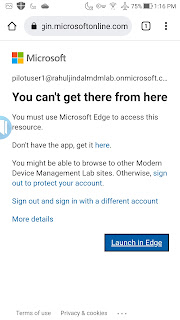
The importance of mobile security is on the rise and to secure web access, Microsoft recommends using Edge to prevent data leakage, not just on mobile devices but across all device platforms. Being an approved browser for mobile devices, policies can be enforced to protect Office 365 services like Exchange Online, SharePoint Online, the Office portal, and even access to on-premises (intranet) sites via the Azure AD Application Proxy. In addition to this, Edge supports multi-identity which means users can add both work & a personal account, thus allowing complete separation between the two identities. Something which is already offered in other Microsoft mobile apps.  Be it Intune or a third party MDM, managed app configuation can be enforced to pre-load corporate specific settings and also leverage Azure conditional access policies to enforce controls to allow access only using Edge. In this blog, we are going to take a look at what all is involved in putting the configuration ...