Posts

Showing posts with the label MDM

New Microsoft Defender app and bulk tagging for iOS\iPadOS using Intune
Image
  Credits: Microsoft In my recent blog about device tagging for macOS devices in Defender , I had mentioned about covering tagging feature for iOS\iPadOS platform as well. In this blog, I will cover the specifics for achieving this and my experience overall. The new Microsoft Defender apps Before we get into tagging, I want to touch base upon the recent change involving the renaming and feature offering of the MDE app both in Apple  and Google Play stores. The MDE app is now called Microsoft Defender: Security  in Apple store and is called Microsoft Defender: Antivirus in Google Play store, thus enabling All-in-one security functionality across both personal and work accounts.  Under the personal account, Microsoft Defender will function as a multidevice security app 'Microsoft Defender for individuals' allowing individuals and families to protect their data and devices by offering malware protection, timely security notifications, security tips, and reco...
Managing & securing web access by using Edge for mobile devices

Image
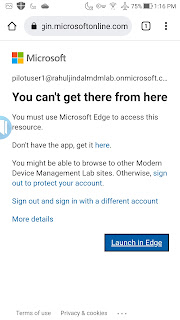
The importance of mobile security is on the rise and to secure web access, Microsoft recommends using Edge to prevent data leakage, not just on mobile devices but across all device platforms. Being an approved browser for mobile devices, policies can be enforced to protect Office 365 services like Exchange Online, SharePoint Online, the Office portal, and even access to on-premises (intranet) sites via the Azure AD Application Proxy. In addition to this, Edge supports multi-identity which means users can add both work & a personal account, thus allowing complete separation between the two identities. Something which is already offered in other Microsoft mobile apps.  Be it Intune or a third party MDM, managed app configuation can be enforced to pre-load corporate specific settings and also leverage Azure conditional access policies to enforce controls to allow access only using Edge. In this blog, we are going to take a look at what all is involved in putting the configuration ...