Posts

A quick way to edit Autopilot .csv file

Image
I have come across many instances online where people have struggled dealing and working with multiple csv files. If you have to upload multiple rows or simply add an attribute, then it is not a straight forward task. Formatting of Autopilot csv files is highly sensitive. If you try to edit them directly in Excel and then save them as .csv, the file will be rendered useless.  By the way, if you are looking for a quick way to create the .csv files then here is the code - New-Item -Type Directory -Path "C:\HWID" Set-Location -Path "C:\HWID" Set-ExecutionPolicy -Scope Process -ExecutionPolicy Unrestricted Install-Script -Name Get-WindowsAutoPilotInfo Get-WindowsAutoPilotInfo.ps1 -OutputFile AutoPilotHWID.csv You can use -append parameter to add multiple rows, but if you want to do it using a GUI or add additional attributes, then you can use the method below which I have found to be effective. 1. Rename the exported .csv file to .txt 2. Open Excel and open the .txt fil...

A pinch of 'Settings Catalog', a dash of 'Filters' and you've got yourself a perfect recipe.

Image
When Microsoft announced the  Settings catalog  feature in February this year, it opened a whole new world to endless possibilities of managing various Windows 10 device settings. The settings are generated directly from Windows Configuration Service Providers (CSP), and the experience in the catalog is dynamically generated based on the type of setting and its metadata. While still in preview, one can see that Microsoft is trying to standardize settings throughout Microsoft Endpoint Manager. Then in May this year, Microsoft released another feature in preview known as  Filters  which is another game changer in how apps and policies can now be assigned at a granular level on specific devices. While the feature does not support all workloads and has some  known issues  (understandably considering it is still in Preview), in my experience the feature works well and has reduced the use of Azure AD Dynamic device groups. Now that we have some background on...

How to force escrowing of BitLocker recovery keys using Intune

Image
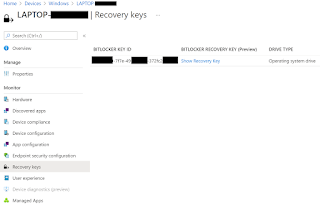
Every now and then it so happens that BitLocker recovery keys do not escrow in AAD. The usual culprits are incorrect BitLocker policies and\or the device hardware configuration failing to meet the minimum requirements. The other scenario and something I recently experienced is when everything is setup right and still the recovery key doesn’t escrow in AAD. As I understand, this can happen if the escrow process got interrupted the first time due to network or local devices related issues and the process could not resume. To circumvent this issue, one can simply push a PowerShell script to the devices to force the escrow of the recovery keys to AAD. Here is a script to do so. try{ $BitlockerVol = Get-BitLockerVolume -MountPoint $env:SystemDrive         $KPID=""         foreach($KP in $BitlockerVol.KeyProtector){             if($KP.KeyProtectorType -eq "RecoveryPassword"){              ...

Using Intune to configure a Scheduled Task to start a service at User logon

Image
If you are looking for a way to execute a command at user logon then this blog may just help you. Recently, I dealt with an issue where users were being prompted to provide UAC credentials in order to allow running of a background service against an application installed using Company Portal. The name of the application is Nord VPN Teams  and since I was working with this application for the first time, I knew very little about it. However, if your users are not admin users and are setup as Standard Users  then it is not hard to imagine that users can receive such prompts from time to time. To get around this, I immediately thought of using Proactive Remediation Scripts feature in Intune. However, the issue with using Proactive Remediation Scripts at the moment is that one cannot make the script run at User logon . Enter the use of good old Task Scheduler in Windows. The solution involves the following at a high level - 1. Define a PS script to detect the status of the serv...

Intune: Different ways of setting a Local Admin account, but is it a good idea?

Image
Security has always been and will always be an important subject and with the increasing number of recent security attacks, I felt compelled to cover the topic of setting local admin accounts on endpoints. Before the landscape of Modern workplace even came into picture, setting a local admin account ( aka break glass account ) has been a common practice. Now that more and more organizations are adopting Modern Workplace framework, this requirement has just evolved. I must point out that even though setting a local admin account is extremely useful and the fact that it allows administrators to perform elevated admin tasks, from a security standpoint it is not such a good idea. But more on that later. Let's see what are the different ways to set the local admin account using Intune. In case of a Domain Account - When you connect a Windows device with Azure AD using Azure AD join, Azure AD adds the following security principals to the local administrators group on the device: - The Az...

Fixing 'SMB Signing Disabled or SMB Signing Not Required' vulnerability.

Image
If your organization is using a vulnerability scanning tool then more often than not, vulnerability like  SMB Signing Disabled or SMB Signing Not Required will flag up and probably make it to the top of the list. This is because most organizations may not have SMB signing enabled by default for all their client and server communications. What is SMB signing? SMB signing is a security mechanism in the SMB protocol which is  designed to help improve the  security of the SMB protocol.  SMB signing adds security to a network using NetBIOS, avoiding  man-in-the-middle attacks and w hen enabled on both the client and server, SMB sessions are  authenticated between the machines on the packet level. According to Microsoft , following SMB configuration scenarios can play out - If SMB Signing is enabled and required at both the client and the server, or if SMB signing is disabled at both the client and the server, the connection is successful. If SMB signing is enabl...

Intune: Let's talk about Device Bulk Actions

Image
Unlike in AAD, where one can select multiple devices to perform a limited number of actions like delete etc, the same cannot be said for Intune as the process is completely different. As a matter of fact, in my opinion it is actually a lot better. With the introduction of Bulk actions back in March 2020, things became a lot convenient. I never got to covering this topic in my blog so decided to do it now. With Bulk actions one can perform the following - 1. Autopilot reset 2. Custom notifications 3. Delete 4. Rename 5. Restart 6. Sync 7. Wipe 8. Retire The best part is that these actions are not just limited to Windows and are supported across other OS platforms as well. However, please note that not all actions will work against all the supported OS platforms. I recently needed to delete personal Windows devices that were enrolled in Intune so decided to use Bulk actions . Process is as follows - 1. Open https://endpoint.microsoft.com 2. Select OS and device action. I selected...