Posts

Intune: Let's talk about Device Bulk Actions

Image
Unlike in AAD, where one can select multiple devices to perform a limited number of actions like delete etc, the same cannot be said for Intune as the process is completely different. As a matter of fact, in my opinion it is actually a lot better. With the introduction of Bulk actions back in March 2020, things became a lot convenient. I never got to covering this topic in my blog so decided to do it now. With Bulk actions one can perform the following - 1. Autopilot reset 2. Custom notifications 3. Delete 4. Rename 5. Restart 6. Sync 7. Wipe 8. Retire The best part is that these actions are not just limited to Windows and are supported across other OS platforms as well. However, please note that not all actions will work against all the supported OS platforms. I recently needed to delete personal Windows devices that were enrolled in Intune so decided to use Bulk actions . Process is as follows - 1. Open https://endpoint.microsoft.com 2. Select OS and device action. I selected...

ConfigMgr: CMPivot in all its glory

Image
CMPivot was first introduced in ConfigMgr CB 1806 and since its release, ConfigMgr as a product has became a little more real time. Especially when it comes to pulling deployment or compliance status. I must admit that I didn’t use CMPivot much earlier, but ever since remote working became the new normal, I started using CMPivot queries regularly and the more I used it, the more I found myself appreciating the efforts of the product team behind implementing this great feature . If you manage your end user devices over the internet using  Cloud Management Gateway  (CMG), you would understand the pain of not being able to perform any remote administration tasks like checking the logs, or taking remote control etc. This is where CMPivot query can be really helpful. According to Microsoft:- CMPivot allows you to quickly assess the state of devices in your environment and take necessary actions. When you enter a query, CMPivot will run a query in real - time on all currently connec...

How to Block Windows Hello for Business using Account Protection policy in Intune

Image
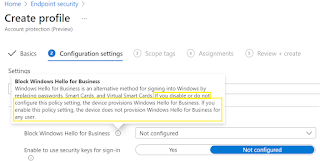
In one of my earlier blogs , I had covered how to setup Windows Hello for Business (WHfB). In this blog I want to cover how you can block it completely using Intune. Recently, I had a requirement where the customer wasn’t ready to enable WHfB in their organization. While the feature can be disabled tenant wide, it only applies during the Out of Box Experience or OOBE at the time of device enrollment. Also, the tenant wide setting will not apply if a device is already enrolled. One obviously needs to meet the pre-requisites to be able to use the feature and you can refer to the Microsoft's official link . Now if you want to perform an Autopilot reset to re-provision a device, then WHfB will get enabled by default.  This is because according to Microsoft , “When Windows 10 was released to general availability, Microsoft changed the behavior of the Office 365 Azure AD stack. When a user selects the option to join a work or school network, the device is automatically joined to the Of...

Intune: UAC Elevation Prompt Behavior for Standard Users

Image
Implementing and maintaining a good security posture is an integral part of overall IT security governance for most organizations now. While you want to harden the security of infrastructure and give least number of privileges to your end users, sometimes you may need to cut back on the restrictions to ensure a good user experience and an effective IT support process. Recently, I had a requirement where the customer wanted to ease the restriction on the end user devices to make the helpdesk support process more efficient. This involved easing the UAC level access for the Standard users and if you are managing your devices using Intune, then this blog may just help you. Let us see what all is involved and some of the ways that you can use to implement this easily. Policy CSP – LocalPoliciesSecurityOptions LocalPoliciesSecurityOptions has many CSP settings and if you are managing these settings at an individual level, then the CSP that we need to concern ourselves with here is U...

How to fix broken device sync using Proactive Remediation Scripts feature in Intune

Image
In the world of Microsoft Endpoint Management (MEM), it is important that devices regularly check in with Intune. If this breaks down, then one practically loses the ability to manage the devices for any MDM based policies. However, not everything is lost at this point and there is a way to get around this and get your devices checking in again. I recently dealt with an issue where devices stopped checking in soon after they were enrolled. While the investigation is on to find the root cause, a 3 rd party remote management application is under suspicion. Now I don’t want to go into too much detail about the application as the investigation has not concluded yet, but I must say that the app was found to be interfering with the Intune services during Autopilot and had to be removed from the standard list of apps. Instead, it was made available to users to install from the Company Portal and almost every device where it was installed, stopped checking in. On further investigation, it...

How to configure Custom Office Templates using Intune

Image
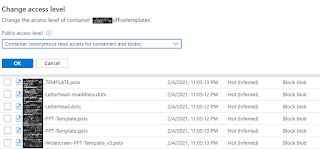
Most organizations use custom office templates and traditionally GPO would be used to configure them. However, things are evolving and traditional methods may not get you the desired results anymore. One will need a more robust method which allows you to manage the templates centrally and update the same on end user devices quickly and efficiently. I recently had a similar requirement and decided to blog about the configuration I put in place. Things that you will need – Devices enrolled into Intune. Azure Blob Storage. Onedrive for Business installed and configured for Known folder Move (KFM) Step 1 – Upload the templates in the Blob storage and set the relevant permissions. You can set it to Private to make it restrictive, but I am choosing to make it Anonymous for the Container at a granular level.   Step 2 – Create the Admin template policy to configure the custom templates location as shown below – Sign-in to the  https://endpoint.microsoft.com Browse to...