Posts

Intune: Desktop & Start menu customizations

Image
Ever since endpoint device management gravitated towards Intune (aka Microsoft Endpoint Management or MEM), the need for SOE management (Standard Operating Environment) for end user devices has become a prime requirement. A small but important part of this is implementing Windows 10 customizations to suit organizational needs.  I recently had to implement the same for a customer so wanted to cover some unique & specific aspects through this blog. Desktop Icons Customization If you are anything like me who likes his desktop clean or have a similar SOE requirement in your organization then the following method may just help you. A Powershell script can be used to clean the desktop for all the unwanted icons and place custom icons like ‘This PC’ shortcut. I did the same for devices that were getting provisioned using Autopilot. Please note that this will nuke all the icons for all user profiles so use it carefully. Get-ChildItem $env:Public\Desktop\*.lnk | ForEach-Object ...

Intune: Configure Printers for Non-Administrative Users

Image
Configuring printers for end users or giving them the ability to do it themselves is a normal requirement for organizations. Now if your users are Administrators, then the configuration can be straight forward, but in case of Non-Administrators there are additional steps required as Non-Administrators will not be able to add a driver in the driver store despite being able to install a printer. In this blog, I will cover the steps that I took to address this requirement using Intune. The setup involves 2 steps -  1. Setup registries. 2. Install the driver and configure the printer Setting up registries – The registries that need to be configured are actually part of a GPO setting – Allow non-administrators to install drivers for these device setup classes It can be found under: Computer Configuration -> Policies -> Administrative Templates -> System -> Driver Installation I used a Powershell script to set the values and wrapped it in a Win32 application. $P...

Intune: Windows Hello for Business

Image
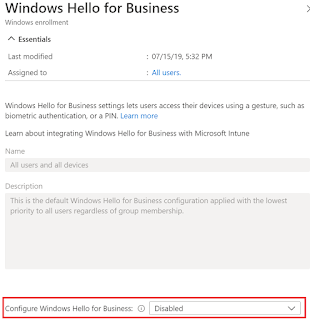
Windows Hello for Business has been aroun d for some time as an alternative sign-in method and it allows a user gesture to sign-in instead of just using a password. There are many sign-in gestures available and depending on what is supported based on the hardware, one can configure a PIN, biometric or a fingerprint. For corporate devices, PIN is the most suited method and it is easily configurable on Intune managed devices. However, I will cover other settings in this blog as well. Now Windows Hello for Business is Not Configured by default. So, in case you do not want to enable it for all your users (Remember this setting is a tenant wide setting) then you will need to atleast configure it to Disable for Intune to be able to manage the feature.   Once in place, one can then deploy a Windows Identity protection profile policy to devices of your choice to enable the feature along with the desired configuration. Let’s begin Browse to Devices – Windows –...

Intune - Manage Google Chrome Settings

Image
Not so while ago, I covered the management of Edge browser settings in my blog here . To continue blogging on MDM management capabilities using Intune, I wanted to cover the settings for managing Google Chrome as well.  Managing Google Chrome consists of two parts  - a. Deploying of Chrome ADMX file to the Intune managed device using a custom policy. b. Deploying the actual set of settings using custom policies . Let’s begin. 1. Download the Chrome ADMX template in order to ingest in Intune. 2. Sign-in to the  https://endpoint.microsoft.com . 3. Browse to Devices – Windows – Configuration profiles 4. Click Create Profile 5. Choose Windows 10 and later as Platform 6. Choose Custom as Profile type 7. Click Create 8. Give a name 9. Add OMA-URI settings as covered below Name: Chrome ADMX OMA-URI: ./Device/Vendor/MSFT/Policy/ConfigOperations/ADMXInstall/Chrome/Policy/ChromeAdmx Data Type...

MEMCM: Fixing MS15-011 Vulnerability in Group Policy that could allow remote code execution, using Compliance Settings in ConfigMgr

Image
For past couple of months, I have been working on a vulnerability assessment project and as part of the exercise, I came across a vulnerability related to MS15-011: Vulnerability in Group Policy could allow remote code execution , that was flagged up on many servers. Nothing unusual about it and is easily fixable as long as you dot all the i’s and cross all the t’s. Nonetheless, I wanted to blog my experience in an endeavor to make it easier for others to implement this, should you choose to follow the method as documented below. What is ‘ MS15-011: Vulnerability in Group Policy could allow remote code execution’ all about? According to official documentation by MS , A remote code execution vulnerability exists in how Group Policy receives and applies connection data when a domain-joined system connects to a domain controller. An attacker who successfully exploited this vulnerability could take complete control of an affected system. An attacker could then install programs, could...

Intune - Microsoft Edge browser settings & extensions

Image
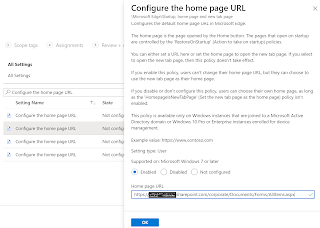
In this blog I will cover some of the settings of Microsoft Edge browser configured using built in administrative templates in Intune.  Using Intune to manage and enforce policies is equivalent to using Active Directory Group Policy or configuring local Group Policy Object (GPO) settings on user devices. For a complete list of Microsoft edge policies, you can check the link here . Let’s begin 1.      Sign-in to the  https://endpoint.microsoft.com 2.      Browse to Devices – Windows – Configuration profiles 3.      Click Create Profile 4.      Choose Windows 10 and later as Platform 5.      Choose Administrative Templates as Profile type 6.      Click Create 7.      Give a name 8.      Use the search field ("Search to filter items ...") to find a spec...